


... Skip to content
Edit Content
VTECZ website logo – AI tools, automation, trends, and artificial intelligence insights
  • AI Trends
  • AI Tools
  • How-To Guides
  • AI Tech
  • Business
  • Events
  • AI Trends
  • AI Tools
  • How-To Guides
  • AI Tech
  • Business
  • Events

Useful Links

  • About Us
  • Contact Us
  • Privacy & Policy
  • Disclaimer
  • Terms & Conditions
  • Advertise
  • Write for Us
  • Cookie Policy
  • Author Bio
  • Affiliate Disclosure
  • Editorial Policy
  • Sitemap
  • About Us
  • Contact Us
  • Privacy & Policy
  • Disclaimer
  • Terms & Conditions
  • Advertise
  • Write for Us
  • Cookie Policy
  • Author Bio
  • Affiliate Disclosure
  • Editorial Policy
  • Sitemap

Follow Us

Facebook X-twitter Youtube Instagram
VTECZ website logo – AI tools, automation, trends, and artificial intelligence insights
  • AI Trends
  • AI Tools
  • How-To Guides
  • AI Tech
  • Business
  • Events
Sign Up
Windows 12 desktop showcasing AI-powered interface with predictive search, voice input, and contextual assistance.

Microsoft New Copilot Function in Excel Lets Users Automate Summaries and Classifications in Beta Rollout

Ashish Singh by Ashish Singh
August 19, 2025
Share on FacebookShare on Twitter

Microsoft has introduced a new way to work with data inside Excel by embedding its Copilot artificial intelligence directly into spreadsheet cells. The newly announced COPILOT function allows users to generate AI-powered results using natural-language prompts, turning traditional spreadsheets into dynamic, adaptive platforms that update in real time.According to Microsoft’s Insider Blog, the feature is now available to beta channel testers with Microsoft 365 Copilot licenses on both Windows and Mac. A rollout for Excel on the web is also planned through the Frontier program.

Read also:Microsoft’s Vision for Windows 12: Prioritizing User Intent Over Clicks with Advanced AI Integration

How the COPILOT Function Works

Copilot function works like any other formula in excel, however, these actions are done by using large language models rather than simple calculations and COPILOT analyzes, summarizes, or generates new content directly in the grid. The function is applied to entries in users where they may use a prompt with optional reference to cells and ranged areas. As an example, the formula =COPILOT(“Classify this feedback”, D4:D18) will be able to examine customer remarks located within a variety of cells and reveal sentiment markers like positive or negative.

Outputs are updated automatically any time underlying data are altered, since the function is part of the Excel calculation engine. In the announcement made by Microsoft, Catherine Pidgeon, the Partner Director working on the excel team explained that the tool is meant to help save time on processes such as feedback wrangling, product brainstorming, or information taxonomy. The AI is able to create tables as well, lists and even to create together with the already existing formulas like IF, SWITCH or LAMBDA. Microsoft has cleared that it does not use the data entered using COPILOT function to train its AI models. The inputs retained are treated as confidential, and are handled only to produce the desired outputs.
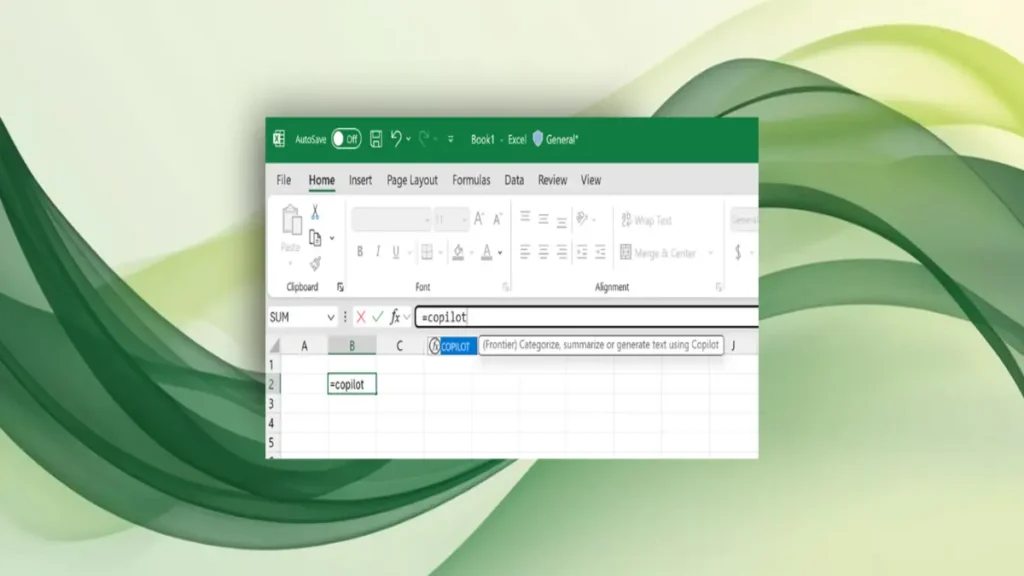
How the COPILOT Function Works

Read also :New Microsoft’s Copilot 3D Turns Images Into 3D Models

Built-in AI Accelerates Productivity

The company focused on a few cases of situations in the wholesale area when the new functionality can accelerate the activities. Marketers can create SEO keyword lists based on product descriptions, researchers can reduce hours of data into brief summaries and survey analysts can categorize the responses to the surveys without the need to export data to a different tool. Insiders point out that the desired output can also be in multi-row and multi-column format that spill over to the spreadsheet grid to enable one to draft a project plan or compile a set of datasets in a few seconds. This extends on the previous experimental LABS.GENERATIVEAI () function that was tested in Excel Labs and led the way to the Copilot integration.

The COPILOT feature includes automatic limitations of 100 calls in 10- minute and 300 calls an hour. Microsoft recommends the metadata of large ranges under one call, rather than pushing the function horizontally over a series of cells. These limits, the company wrote, can be expanded with the advancement of testing. Industry critics have responded that the role makes Excel more than a calculator. According to reports in community forums the finance and operations teams are experimenting with AI-based classifications and summaries that change as their data changes, transforming the stale spreadsheet into a living work of analysis.
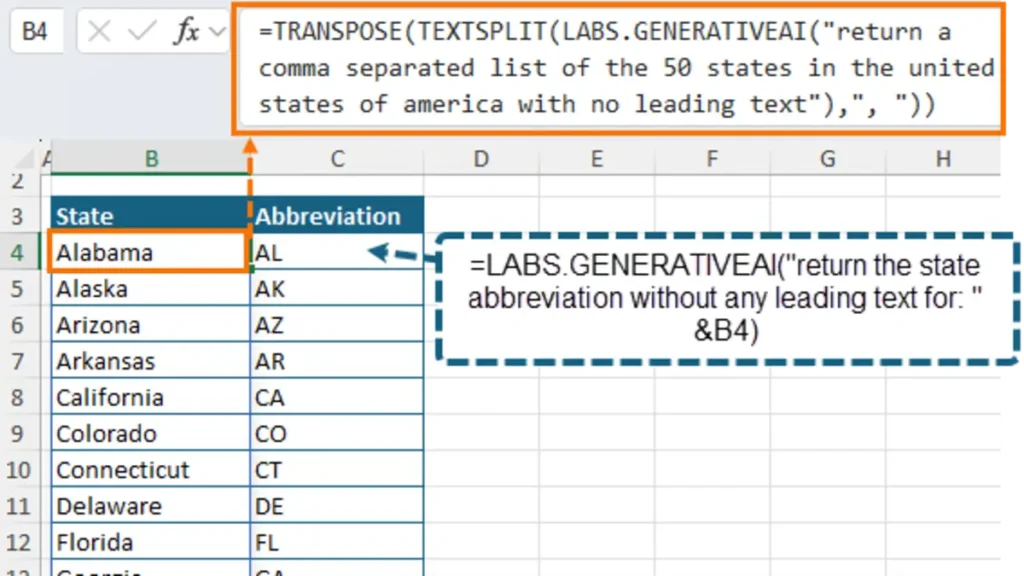
Productivity Boosts with Built-In AI

Difficulties and the Prospect of Development

Although the role boosts the productivity, it brings issues with regulation and error. Analysts have cautioned that the outcomes produced by AI should be checked out to detect possible errors or biasness, especially where such business deals are sensitive. Even Microsoft itself has mentioned that that tool should not be used on tasks that would merely suit the regular Excel formulas, such as straightforward mathematical tasks. Currently, the COPILOT functionality is not able to talk to a live web or talk to internal enterprise documents. Rather, users would have to import pertinent data sets to their workbooks then run instructions.

Microsoft has reported that it is investigating support of wider data sources in future releases. There are technical improvements also being taken under consideration. They include improved large array handling, improved model results, hints on inappropriate prompts, and improved date support, as dates are now written out as text instead of in Excel serial format. Irrespective of these shortcomings, beta testers have given positive response. The capability of the function to simplify a complicated set of data and provide a plain language analysis in calculations has been commended by most people. Microsoft noted that feedback is also gathered with the help of buttons (thumbs-up/thumbs-down) that are displayed inline in Excel near results generated by AI.

Impact for Microsoft 365 Users

The introduction of Copilot in Excel reflects Microsoft’s broader strategy of embedding AI across its Office applications. Previous integrations have appeared in Word, Outlook, and Teams, but Excel’s position as a cornerstone for business data makes this rollout especially significant.Analysts say the move underscores Microsoft’s efforts to monetize Copilot as a premium add-on for enterprise users. By embedding AI directly into the calculation engine, the company is positioning Excel as both a number-crunching tool and a platform for intelligent insights


FAQs

What is the Copilot function in Excel?

The Copilot function is a new formula in Excel that allows users to enter natural-language prompts in a cell. It processes the input using large language models to generate summaries, classifications, or lists directly in the spreadsheet grid.

How does the Copilot function differ from normal Excel formulas?

Unlike traditional formulas that perform calculations, the Copilot function interprets text prompts and context from cell references. It can analyze data ranges, classify feedback, or generate summaries, with results updating automatically when the underlying data changes.

Who can access the Copilot function in Excel?

The feature is currently available to beta channel testers with a Microsoft 365 Copilot license. It is supported on Excel for Windows (Version 2509 or later), Mac (Version 16.101 or later), and will soon roll out to Excel for the web via the Frontier program.

Does the Copilot function use my data to train Microsoft’s AI models?

No. Microsoft has confirmed that data processed through the Copilot function remains confidential. It is used only to generate the requested output and is not stored or used to train AI models.
Tags: Excel CopilotMicrosoft Excel
Ashish Singh

Ashish Singh

Ashish — Senior Writer & Industrial Domain Expert Ashish is a seasoned professional with over 7 years of industrial experience combined with a strong passion for writing. He specializes in creating high-quality, detailed content covering industrial technologies, process automation, and emerging tech trends. Ashish’s unique blend of industry knowledge and professional writing skills ensures that readers receive insightful and practical information backed by real-world expertise. Highlights: 7+ years of industrial domain experience Expert in technology and industrial process content Skilled in SEO-driven, professional writing Leads editorial quality and content accuracy at The Mainland Moment

Next Post
AI bank statement generator automating U.S. financial record-keeping and fraud detection in 2025.

Revolutionizing Finance: How AI Bank Statement Generators are Automating Record-Keeping and Fraud Detection in 2025

Comments 1

  1. Pingback: How Microsoft’s Windows 11 Preview Uses AI to Improve External Webcams With Studio Effects and Fluid Dictation

Leave a Reply Cancel reply

Your email address will not be published. Required fields are marked *

Recommended.

Meta’s Bold Strategy to Outshine Apple and Google in the Race for AI Dominance on Personal Devices

Meta’s Bold Strategy to Outshine Apple and Google in the Race for AI Dominance on Personal Devices

August 22, 2025
Top 7 Questions You Should Never Ask ChatGPT or Any AI Chatbot

Top 7 Questions You Should Never Ask ChatGPT or Any AI Chatbot

July 23, 2025

Trending.

AI text remover tool in WPS Photos seamlessly removing text from an image background

Recraft AI Magic: Can You Really Remove Text from Images Seamlessly? (Step-by-Step Tutorial)

August 1, 2025
A futuristic AI interface with glowing code and the Claude Opus logo.

Anthropic Expands Claude AI Capabilities with File Creation and Editing Across Excel, Word, PowerPoint, and PDF Formats

September 10, 2025
Global experts, investors, and startups gather at the AI Innovators Summit 2026 California in San Francisco to shape the future of AI.

AI Innovators Summit 2026 California: Where Next-Gen AI Tools Meet Venture Capital, Universities & Silicon Valley Disruption

September 9, 2025
Windows 11 Copilot+ PCs Add NPU-Powered Live Captions, Studio Effects and File Explorer AI Actions

Windows 11 Copilot+ PCs AI Features: Live Captions, Studio Effects & File Explorer Actions Explained

September 8, 2025
Google Translate app showcasing AI-powered practice and live translation features designed to rival Duolingo.

Google Translate Challenges Duolingo: Next-Gen AI Tools That Could Redefine Language Learning

August 27, 2025
VTECZ website logo – AI tools, automation, trends, and artificial intelligence insights

Welcome to Vtecz – Your Gateway to the World of Artificial Intelligence
At Vtecz, we bring you the latest updates, insights, and innovations from the ever-evolving world of Artificial Intelligence. Whether you’re a tech enthusiast, a developer, or just curious about AI.

  • AI Trends
  • AI Tools
  • How-To Guides
  • AI Tech
  • Business
  • Events
  • AI Trends
  • AI Tools
  • How-To Guides
  • AI Tech
  • Business
  • Events
  • About Us
  • Contact Us
  • Privacy & Policy
  • Disclaimer
  • Terms & Conditions
  • Advertise
  • Write for Us
  • Cookie Policy
  • Author Bio
  • Affiliate Disclosure
  • Editorial Policy
  • Sitemap
  • About Us
  • Contact Us
  • Privacy & Policy
  • Disclaimer
  • Terms & Conditions
  • Advertise
  • Write for Us
  • Cookie Policy
  • Author Bio
  • Affiliate Disclosure
  • Editorial Policy
  • Sitemap

Why Choose us?

  • Trending AI News
  • Breakthroughs in Machine Learning & Robotics
  • Cutting-edge AI Tools and Reviews
  • Deep Dives into Emerging AI Technologies

Stay ahead with daily blogs that simplify complex topics, analyze industry trends, and showcase how AI is shaping the future.
Vtecz is more than a blog—it’s your daily AI companion.

Copyright © 2026 VTECZ | Powered by VTECZ
VTECZ website logo – AI tools, automation, trends, and artificial intelligence insights
Icon-facebook Instagram X-twitter Icon-linkedin Threads Youtube Whatsapp
No Result
View All Result
  • AI Trends
  • AI Tools
  • How-To Guides
  • AI Tech
  • Business
  • Events

© 2025 Vtecz. All rights reserved.

Newsletter

Subscribe to our weekly newsletter below and never miss the latest news an exclusive offer.

Enter your email address

Thanks, I’m not interested

Seraphinite AcceleratorOptimized by Seraphinite Accelerator
Turns on site high speed to be attractive for people and search engines.